 .
. The Check History lists by account the checks that have been printed or voided. It also allows you to get more details about each check and run a history report.
From the
main screen of CollectMax, click the .
Select the
 tab and then the
  button to get the Check
History Screen.
button to get the Check
History Screen.
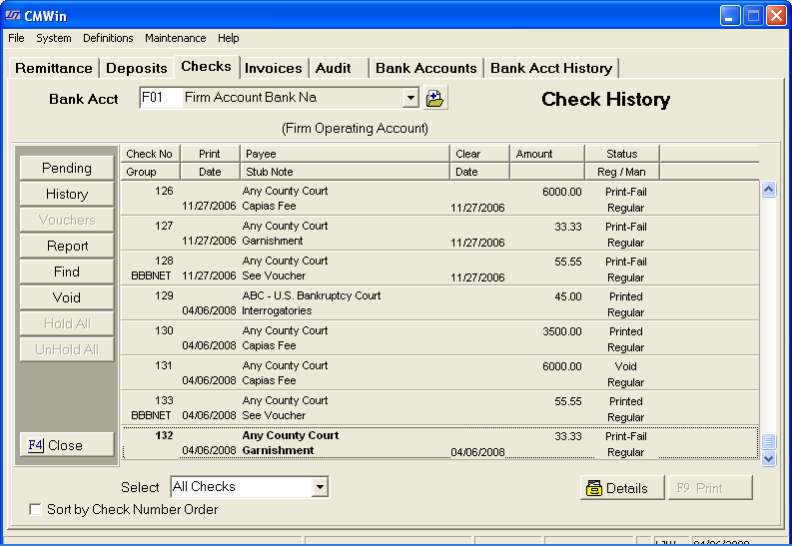
Select the bank account whose history you would like to review
 by
clicking the
by
clicking the  button and selecting the account.
A list of
printed, voided and print -failed checks will be shown. You
may select to sort them in check number order.  . Click
the
. Click
the  box to select this option.
Additionally,
You may find checks by their check number. Click
the  button.
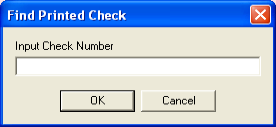
Type in the
check number and click the  button. This
will take you directly to this check.
button. This
will take you directly to this check.
You can print a Check History Report from this screen.
To see the
details of any check, click on the check to make it bold.
Then click
the  button.
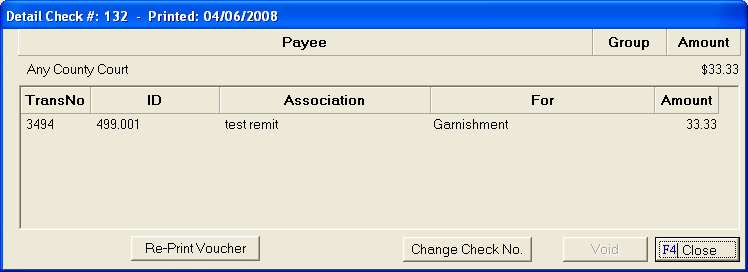
This screen
will allow you to see the payee, amount, transaction number for this check.
From this
screen you can also change the check number by clicking the  button and entering a new check number and click the
  button.
To exit the
details screen, click the  button.
You may also void the check from this screen, see How to Void a Check.
The check history screen will also allow users to void checks never written through our program, see How to Enter a Non-printed Voided Check.
To exit the check history screen and go back to the main menu of CollectMax, click the button.