 button.
 Users may need to use this option if checks were left in the printer and a report or document was mistakenly printed on them. For tracking purposes you may want to put a voided record in the Check History. CollectMax makes allowances to void these checks and enter a history record.
1.
From the
main screen of CollectMax, click the button.
2.
Select
the  tab.
tab.
3.
Click the
 button.
4.
Select
the  button to bring up the Insert Voided Check History
Screen.
button to bring up the Insert Voided Check History
Screen.
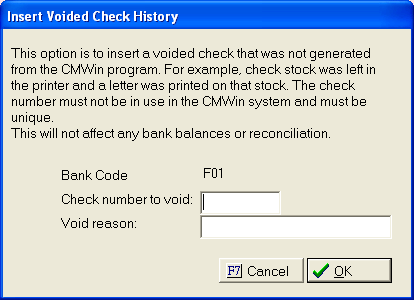
5. Enter the check number to void and the reason you needed to void it.
6.
Click the
 button. This
will insert a record into to check history.
button. This
will insert a record into to check history.
Note: This can only be done if the check number is a unique number. If not, you will not be able to complete the process.
7.
To exit
the check history screen, click the  button.