 button. Select
the
button. Select
the  tab. And
from the Pending Checks Screen, select the
tab. And
from the Pending Checks Screen, select the  button. This
will bring up the Check History Screen.
button. This
will bring up the Check History Screen. From the
main screen of CollectMax, click the button. Select
the tab. And
from the Pending Checks Screen, select the button. This
will bring up the Check History Screen.
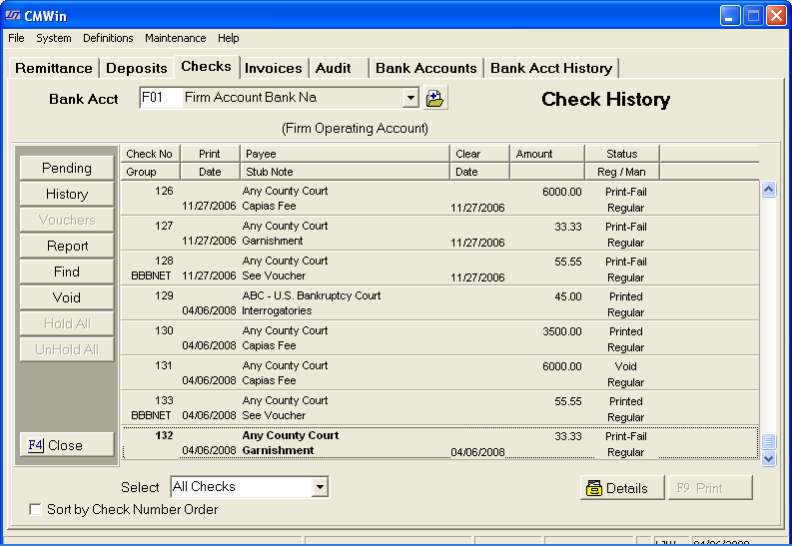
Select the account the check from which the check was written.

Click the
 and pick the account from the list.
Next, find
the check to be voided, by either scrolling down or clicking the  button and entering the check number.
Once you
have found the check to be voided, click on the check to make it bold. Then,
click the  button to display the detail of the check to
be voided.
button to display the detail of the check to
be voided.
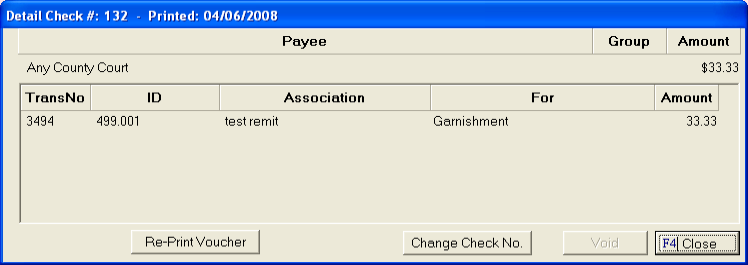
Click the
 button, you will be prompted to enter the master password,
type it in and click the
button, you will be prompted to enter the master password,
type it in and click the  button.
A message box will appear let you know that the check will now be voided and put back to the pending checks screen.

To view the
check, click the  button.
Once the check has been returned to pending the only way to remove the check is to delete or reverse the transaction that requested the check.