Case Inventory Summary Report Selection Criteria
Use the following selection
criteria to narrow down the accounts to be included on this report. Otherwise,
the report will list all accounts for all clients with a close
date on or after the default date.
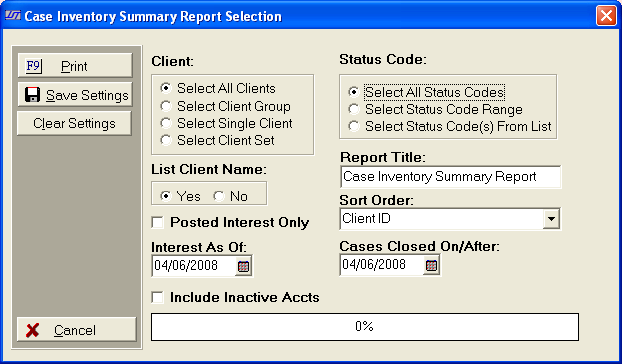
- Client: Select to include All Clients, a Client
Group, a Single Client or a Client Set only accounts with this client
selection will be eligible for inclusion on this report.
- Status Code: Select to include accounts
with All Status Codes, a Status Code Range or Status Code(s)
From List only accounts with the selected status codes will eligible
for inclusion on this report.
- List
Client Name: Click Yes radio button to list Client Name on report. Otherwise, click No to not list client name
on report.
- Report title: The report title will
default to Case Inventory Summary Report. To change the title, click in
text box and enter new name.
- Posted Interest: To show only the posted
interest on the selected accounts, check the Posted Interest Only box.
Otherwise,
the report will list all interest including New Interest.
- Interest As Of: Click the
 button and select the Interest As Of date to show all interest
including new interest through the selected date.
button and select the Interest As Of date to show all interest
including new interest through the selected date.
- Sort Order: Click the
 arrow and select to order they report by Client Id or Client
Name.
arrow and select to order they report by Client Id or Client
Name.
- Case Closed On/After: Click the button and select the Cases Closed On/After date. Only
accounts that have a closed date on or after the selected date. To
include all accounts, delete the date.
- Inactive
Accounts: Click check box to have Inactive
Accounts included on the report.
- Save Settings: To save these report
settings, click the
 button. Users
do not have to save settings to run the report with the current selections.
The
save settings option can be used as a short cut when running future reports.
Select
the most common settings and click the button. The
next time this report accessed it will show the settings that were saved.
button. Users
do not have to save settings to run the report with the current selections.
The
save settings option can be used as a short cut when running future reports.
Select
the most common settings and click the button. The
next time this report accessed it will show the settings that were saved.
- Print: To generate report click Print.
Then select to print to File, Printer, Screen or Cancel generation of
report.
- Case Inventory Summary Report Sample