Liquidation Summary Advanced Options
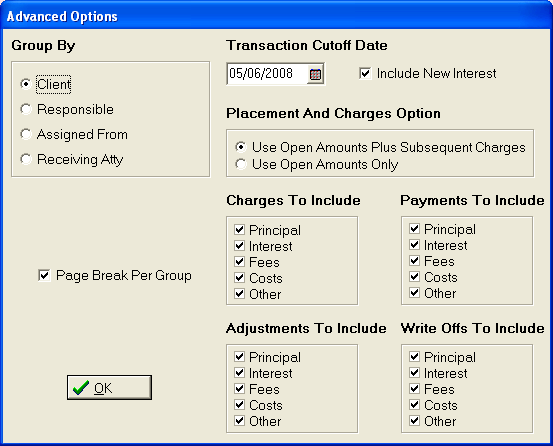
- Group By: Choose to group the report
by Client, Responsible,
Assigned From or Receiving
Atty.
- Page Break: Click the
 box to have a page break inserted between each group.
- Percent Collected: Select the appropriate
Percent Collected selection to be included
on the report.
- Transaction Cutoff Date: Select the
Transaction Cutoff Date. The
report will only include transactions posted on or before the selected
Cutoff Date.
- Include New Interest: Click the box to Include New Interest
in the balances.
- Placement and Charges Options: Select
the placement and charges to include in the placement balances for the
report. User
can select the Open Balance Only or the Open Balance plus later charges.
- Charges to Include: Click the box next to balance component(s) that should include any
charges posted. See Charges to Include.
- Payments To Include: Click the box next to balance component(s) that should include any
payments posted. See Payments to Include.
- Adjustments To Include: Click the box next to balance component(s) that should include any
Adjustments. See Adjustments to Include.
- Write Offs To Include: Click the box next to balance component(s) that should include any
Write Off Adjustments. See Write Offs to
Include.
Select the  button
to continue with the report selection criteria.
button
to continue with the report selection criteria.