 button on the main screen of
CollectMax, click on the
button on the main screen of
CollectMax, click on the  tab which will take you to the
pending deposits screen. From
there click on the
tab which will take you to the
pending deposits screen. From
there click on the  button to go to the Deposit History screen.
Reversing or Deleting a debtor payment or client credit transaction may prompt you to unpost a deposit. Or you may need to correct a error made on a deposit.
To unpost
a deposit, click on the button on the main screen of
CollectMax, click on the tab which will take you to the
pending deposits screen. From
there click on the button to go to the Deposit History screen.

Select the
deposit that needs to be unposted,
by clicking on the item to select it  . Click
the
. Click
the  button. Verify
the deposit contains the payment to be reversed or that this indeed is
the deposit you would like to unpost.
button. Verify
the deposit contains the payment to be reversed or that this indeed is
the deposit you would like to unpost.
Hint: If the reason you are unposting the deposit, is to reverse and re-enter a payment, take note of the deposit balance. It will help you when reposting. Remember when reposting the deposit to change the date to be the original deposit date and make note of the new deposit number.
Click the  button, you will
be prompted with a pop-up confirm screen to continue.
button, you will
be prompted with a pop-up confirm screen to continue. 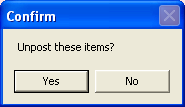 Click
the
Click
the  button to continue. Or,
Click the
button to continue. Or,
Click the  button to cancel the process. If
you choose yes, all the items in this deposit will be sent back to pending
to be re-posted at a later time.
button to cancel the process. If
you choose yes, all the items in this deposit will be sent back to pending
to be re-posted at a later time.
To exit the deposit history screen, click
the  to go the pending deposits screen or click
  to return to the main screen of CollectMax.