 on the CollectMax menu bar at the top of the window.
1.
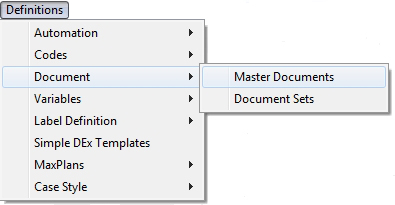
Click on the CollectMax menu bar at the top of the window.
2. Select Documents and Master Documents from lists.
3.
Click the
 button on the left panel of the Master Documents Screen to create a new document.
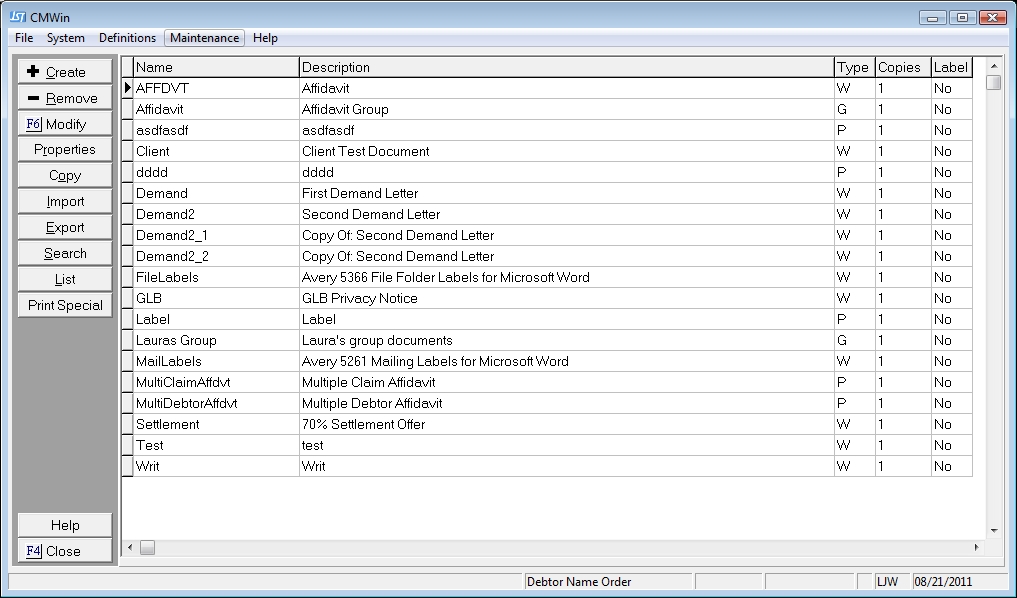
4. In the Create Document Type window, select the document style from the drop down list by clicking on the down arrow. Choose Account/Debtor Form for a standard debtor letter.
Note: Selecting Legal Form will display the document on the selected Litigation Screen only.

5.
Select
the appropriate Default Printer
from the  list
list
.
6. Give your document a Name.
 .
.
Note: Do not use any slashes, quotes or special characters in your document name.
7. Type in a description for your document in the Description field.

8.
Click the  button.
9. Word will open automatically to a blank document. You are now ready to create your document in Word.
10.
Type in document. When you come to a position in your document where you
would like to insert a CollectMax variable, click on the  tab to display the JST Toolbar.
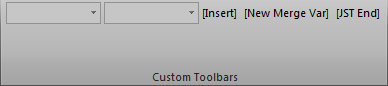
Click the first  list to pick the Group of the variable you would like to insert. Next, select the next list to select the variable. Grouped Variables are typically listed by location in CollectMax. If you are having trouble finding a variable, think of its location in CollectMax and then try looking under the group that matches the location.
Select the proper mergefield. If unsure of which variable to pick, see Variable List for instructions on printing a list of variables.
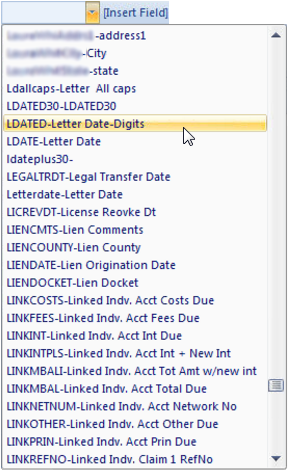
Select the field to insert and click the  button.
11.
Continue entering your text and inserting variables until you have completed
the creation of your Word document. At this point you may click  on
your Word toolbar and you will
return to CollectMax with your new document created.
on
your Word toolbar and you will
return to CollectMax with your new document created.
12.
Now that you have created your document, it is an excellent time to establish
properties for your new document. These
properties are available to simplify procedures associated with document
generation. Highlight
your new document from the document list and click the  button
on the left panel.
button
on the left panel.