 button from the main account screen. Select
the
button from the main account screen. Select
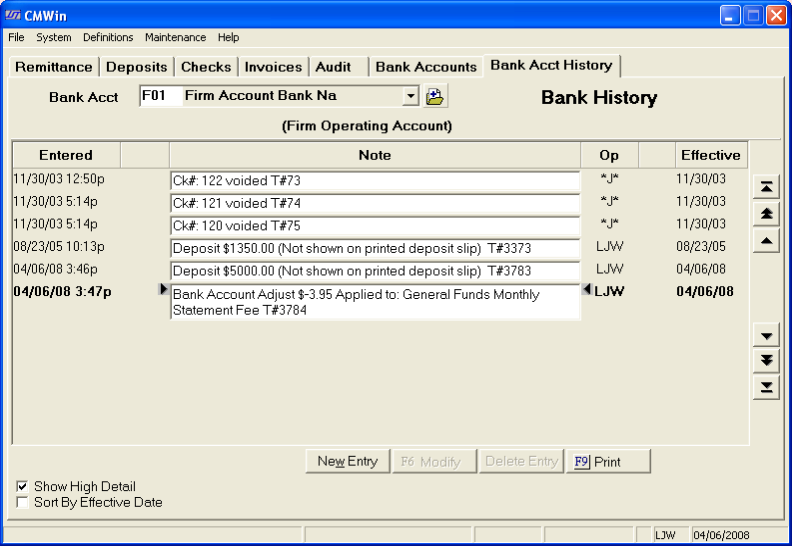
the  tab to get to the Bank Account History Screen.
 CollectMax keeps a history of each bank account. The history includes deposit, reconciliation and note entries.
To review
the Bank Account History, click
on the button from the main account screen. Select
the tab to get to the Bank Account History Screen.
Next select
the Bank Account to review by
clicking on the  button and pick the account from the
list.
button and pick the account from the
list.

This history of the Account will be displayed with the most recent entry highlighted. You may move through the history entries by using the arrow buttons.
The  button takes you to the first history entry.
The  button allows you to page up through the history entries.
The  button allows you to go up one entry at a time.
The  button takes you to the last history entry.
The  button allows you to page down through the history entries.
The  button allows you to go down one entry at a time.
You may choose
to add a note to the history screen. Click
the  button. On
the Add Entry Screen, type the date of the entry in the MM/DD/YYYY
format or click the
button. On
the Add Entry Screen, type the date of the entry in the MM/DD/YYYY
format or click the  button and select the date.
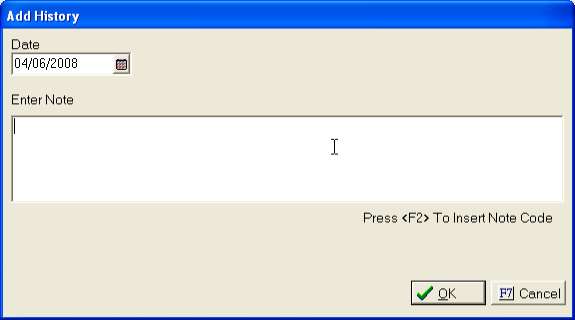
Next add the note by typing in the Note field or click the F2 key on your keyboard to go to the note code screen.
Click the
 button to add the entry.
You may also
modify certain entries by clicking the  and making the changes.
You may also
delete certain entries by clicking the  button.
To
exit the Bank Accounts History Screen, click the  button.